
Quick answer: Use AND when every condition must be true, OR when at least one condition must be true, NOT to reverse a condition, and XOR when an odd number of conditions must be true. With two tests, XOR is true when exactly one is true. These functions return Boolean TRUE or FALSE, so wrap them inside IF when you need a label such as “Eligible” or “Review”.
This guide goes beyond the introductory IF/AND/OR examples already in our Excel IF tutorial. It focuses on translating business rules into formulas, testing tricky cases, and distinguishing ordinary AND/OR formulas from Boolean arithmetic inside SUMPRODUCT and FILTER.
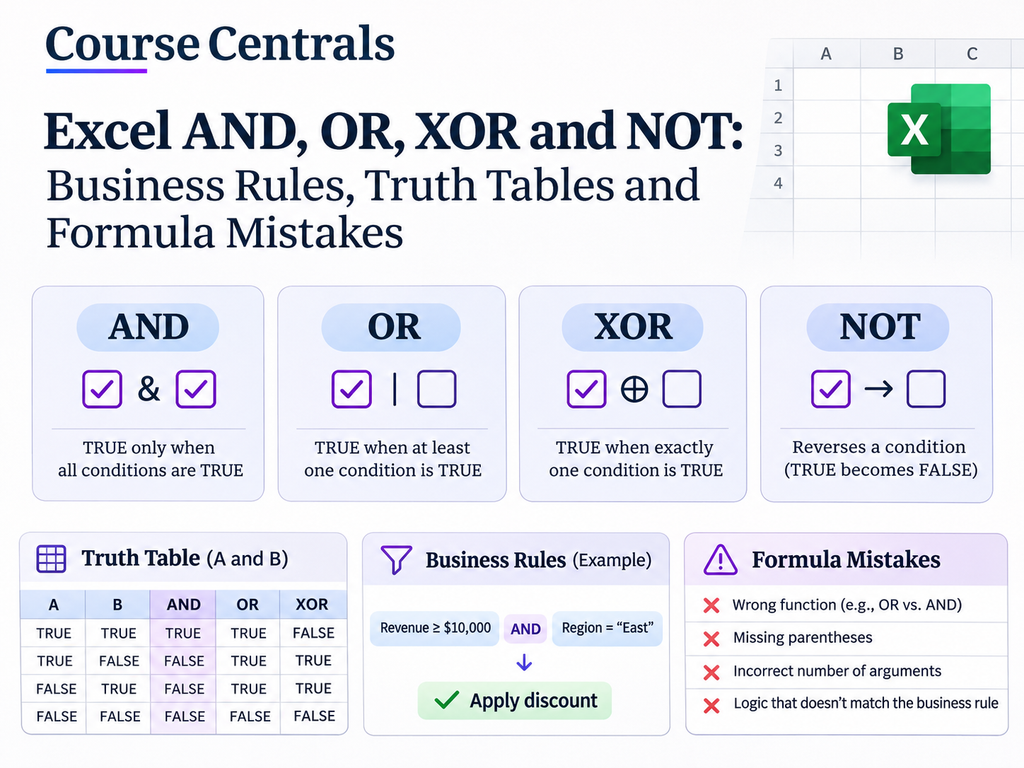
The four Excel logical functions at a glance
| Function | Plain-English rule | Example | TRUE when |
|---|---|---|---|
| AND | Everything must pass | =AND(C2>=2000,D2>=90%) | Sales and attendance meet the thresholds |
| OR | At least one passes | =OR(C2>=3000,E2>=5) | Sales are high or service is long |
| NOT | Reverse a single test | =NOT(B2=”Suspended”) | Staff status is not Suspended |
| XOR | An odd number pass | =XOR(C2>=3000,E2>=5) | One of two tests passes, but not both |
Truth table: AND vs OR vs XOR
| Test A | Test B | AND | OR | XOR |
|---|---|---|---|---|
| FALSE | FALSE | FALSE | FALSE | FALSE |
| FALSE | TRUE | FALSE | TRUE | TRUE |
| TRUE | FALSE | FALSE | TRUE | TRUE |
| TRUE | TRUE | TRUE | TRUE | FALSE |
XOR is often described as “exactly one”, but that description is only correct when you pass two conditions. With three or more conditions, XOR returns TRUE for an odd number of TRUE values. For example =XOR(TRUE,TRUE,TRUE) is TRUE, not FALSE. Microsoft explicitly documents this odd-count rule.
1. AND: when two conditions are mandatory
A hypothetical staff recognition programme requires sales of at least 2,000 and attendance of at least 90%. Put Sales in C2 and Attendance in D2:
=IF(AND(C2>=2000,D2>=90%),"Eligible","Not eligible")With Sales 2,000 and Attendance 90%, the result is Eligible because both comparisons include equality. If Sales is 3,200 and Attendance 89%, the result is Not eligible. A high score cannot make up for a failed mandatory condition.
2. OR: when any one route is acceptable
Now imagine a different recognition policy: employees qualify if they pass both sales and attendance, or have served for at least five years. This is an example policy, not a recommendation for real compensation decisions:
=IF(OR(AND(C2>=2000,D2>=90%),E2>=5),"Award","No award")The parentheses encode the actual policy. AND groups the first route, while OR allows the second route. An employee with five years of service can receive an award even if they do not meet the sales/attendance pair. If that is not what the business intended, the formula is wrong despite returning a plausible result.
3. NOT: express exclusions clearly
=AND(NOT(B2="Suspended"),C2>=2000)This is TRUE only if status is not “Suspended” and the sales threshold is met. The equivalent simple comparison =AND(B2<>"Suspended",C2>=2000) may be easier to read. In Excel, ordinary text comparisons are generally case-insensitive: “Sales” and “sales” are treated as equal. If case matters, use EXACT in an appropriate validation rule.
4. XOR: when exactly one of two statements should be true
=XOR(C2>=3000,E2>=5)For two tests, XOR returns TRUE if sales are 3,000+ or service is five years+, but not both. This might be useful for a two-path eligibility check where a learner must choose one alternative. If you need “at least one” rather than “exactly one”, use OR.
Test the rules against fictional staff data
| Person | Sales | Attendance | Years | AND(sales,attendance) | OR(AND, years≥5) | XOR(sales≥3,000,years≥5) |
|---|---|---|---|---|---|---|
| Maya | 3,800 | 96% | 3 | TRUE | TRUE | TRUE |
| Jamal | 2,450 | 91% | 7 | TRUE | TRUE | TRUE |
| Aisha | 1,850 | 93% | 2 | FALSE | FALSE | FALSE |
| Noah | 3,175 | 89% | 5 | FALSE | TRUE | FALSE |
| Lina | 2,000 | 90% | 1 | TRUE | TRUE | FALSE |
Why is Noah an important test case? Noah fails the mandatory 90% attendance condition, but qualifies under the alternative OR route because of five years of service. Both XOR tests are true for Noah, so XOR returns FALSE. This is the kind of scenario that catches incorrect business translations.
The less obvious problem: AND evaluates its arguments
Do not rely on AND as a safety guard around a calculation that could fail. For example, =AND(A2<>0,B2/A2>1) can still raise #DIV/0! when A2 is zero. Check the zero case with a branch of IF before attempting division:
=IF(A2=0,FALSE,B2/A2>1)This approach expresses the order of operations explicitly. See our related IF tutorial and the formula library for more debugging methods.
Logical math inside SUMPRODUCT and FILTER
With array calculations, * can combine TRUE/FALSE arrays as AND because TRUE/FALSE can be coerced to 1/0, and + can combine tests as OR only if you handle overlaps. These techniques are different from the scalar AND() and OR() functions, which aggregate tests. Microsoft recommends grouping array expressions explicitly.
AND total sales:
=SUMPRODUCT((B2:B6="Sales")*(C2:C6>=2000)*C2:C6)

OR total sales, count each row once:
=SUMPRODUCT(--(((B2:B6="Sales")+(E2:E6>=5))>0),C2:C6)
The second formula uses >0 so a row that matches both conditions contributes its sales once, not twice. Plainly adding two logical tests can create 2 for overlap, which doubles values when multiplied by Sales. Keep array ranges the same size, and avoid entire-column SUMPRODUCT references because they can be computationally expensive.
In modern Excel, FILTER can use the same Boolean-array idea: =FILTER(A2:E6,(B2:B6="Sales")*(C2:C6>=2000),"None"). FILTER is available in Excel 2021+, Excel 2024 and compatible Microsoft 365 products. It returns matching rows instead of reducing them to a single summary.
A fifteen-minute practice exercise
- Create five rows for Name, Department, Sales, Attendance and Years. Start with the values in the table above.
- Write an AND formula for sales at least 2,000 AND attendance at least 90%.
- Write an OR formula for meeting the AND rule OR at least five years of service. Confirm Noah changes outcome.
- Write an XOR formula comparing high sales (3,000+) and long service (5+). Confirm Noah returns FALSE because both are TRUE.
- Summarize Sales for the Sales department or long-service employees without double-counting overlapping rows.
Common errors and FAQs
Does OR mean exactly one?
No. OR is TRUE when one or more conditions pass, including when both pass. XOR is TRUE for an odd number of TRUE conditions.
Can I write =IF(C2>=2000 AND D2>=90%,…)?
No. Excel requires the AND function, as in =IF(AND(C2>=2000,D2>=90%),...).
Why am I getting an error despite checking a condition with AND?
AND is not a reliable short-circuit guard for risky calculations. Use IF to branch before evaluating a division or another operation that may fail.
Should I use AND() inside SUMPRODUCT for a row-by-row test?
Usually use Boolean multiplication of same-sized arrays rather than a single AND() call that returns one Boolean for the entire set.
Official sources and related learning
Verified 14 November 2026. Microsoft sources: AND, XOR, Using IF with AND/OR/NOT, SUMPRODUCT, and FILTER. Continue with SUMIFS and COUNTIFS for multiple-criteria reporting.