
Quick answer: Authentication checks who you are, while authorization decides what you are allowed to access or do. Logging in successfully does not mean you can see another user’s account, edit an administrator’s settings or download every file. A secure application checks both identity and permission, and it checks permissions again for each protected request.
Here is the memorable example: your boarding pass and identity check establish that you are the passenger; they do not give you permission to enter the cockpit. In software, the same distinction separates signing into an app from being allowed to view a particular record. The article includes an original permissions decision matrix and a safe practice exercise.
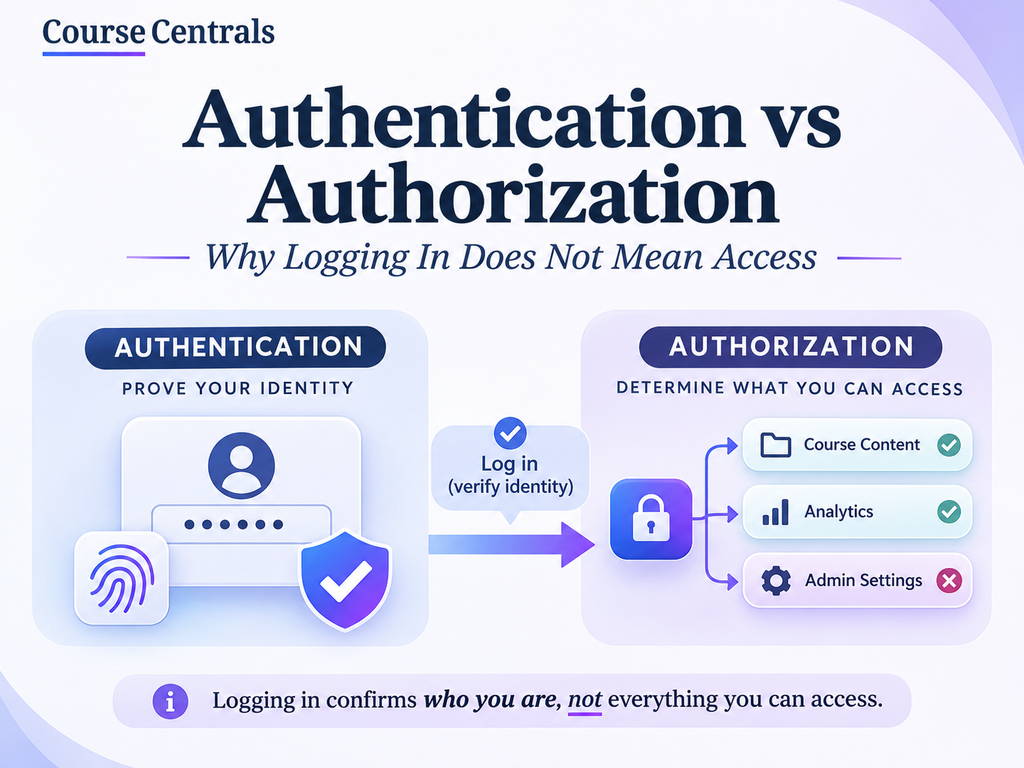
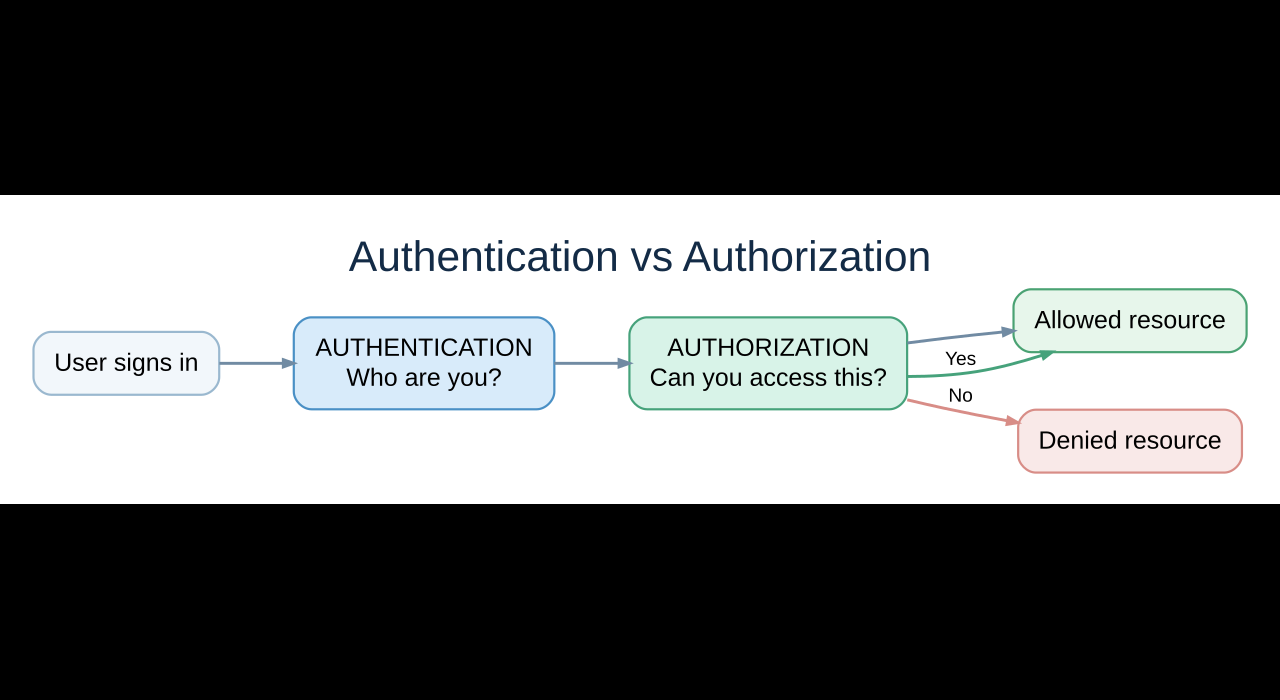
Authentication vs authorization: the essential comparison
| Question | Authentication (AuthN) | Authorization (AuthZ) |
|---|---|---|
| What does it establish? | Identity: who is making this request | Permission: whether that identity can perform this action |
| Typical evidence | Password, passkey, multi-factor authentication or a valid session | Role, resource ownership, policy, context and permission rules |
| Typical example | Signing into a student portal | Being allowed to view your own grades, not another student’s |
| When does it happen? | Usually at sign-in or when a session/token is validated | For every protected resource or action, not just at sign-in |
| Failure to check | An attacker may impersonate a user | A legitimate user may access another person’s data or privileged actions |
| Helpful memory trick | Who are you? | What can you do? |
These concepts are related, but they are not interchangeable. A server can recognize a valid logged-in user and still refuse access to a particular record. The OWASP Authorization Cheat Sheet recommends checking permissions on every request and denying access by default.
1. Authentication explained: proving identity
When you sign into a website, the application checks evidence associated with your account. That might involve a password, a passkey or a second factor. Successful authentication typically results in a session or token that helps the application recognize subsequent requests. A session identifier is not itself permission to do anything; it is a way to associate a request with an identity or security context.
Imagine a university portal. A student enters their credentials and completes a second-factor check. The portal knows which account is signed in. It still needs separate rules to decide whether the student can see course materials, grades or staff-only records.
2. Authorization explained: checking what is allowed
Authorization evaluates a request against a rule. The decision can depend on the identity, requested action, specific resource and relevant context. A lecturer may edit grades for courses they teach but not grades for another department. A student may read their own transcript but not a classmate’s. A support agent may view an order status but not payment credentials.
Important: a visible button is not a security boundary. Hiding an Admin button from a student does not protect the underlying API if the server still accepts unauthorized requests. The server must enforce access controls regardless of what the browser displays.
3. A real-world example: a student portal with three roles
| Action | Student | Lecturer | Registrar |
|---|---|---|---|
| View own profile | Allow | Allow | Allow |
| View another student’s grades | Deny | Only if explicitly authorized for that student/course | Only if authorized for the relevant records |
| Edit assigned course grades | Deny | Allow only for assigned course | Allow only when policy permits |
| Change institution-wide access policies | Deny | Deny | Deny unless separately granted an administrative permission |
This is an illustrative policy matrix, not a universal university rule. Notice that a role label alone is not always enough: the system must check which student, course or record is involved. That is why ownership and relationship checks matter alongside role-based access control (RBAC).
4. HTTP 401 vs 403: why the names are confusing
The status code 401 Unauthorized usually means the request lacks valid authentication credentials for a protected resource. The name is confusing because the practical issue is authentication. 403 Forbidden means the server understood the request but refuses access, often because the authenticated user lacks permission. Some applications deliberately use 404 Not Found to avoid revealing whether a protected resource exists.
| Situation | Typical response | Meaning |
|---|---|---|
| No valid session for a protected API | 401 Unauthorized | Authenticate first or provide valid credentials |
| Signed-in student requests a staff-only action | 403 Forbidden | Identity is known, permission is insufficient |
| Signed-in user requests another person’s hidden record | 403 or sometimes 404 | Access denied; 404 may avoid disclosing resource existence |
| Valid identity and permission for the requested record | 200 OK (for successful retrieval) | The requested resource can be returned |
See the MDN 401 reference and MDN 403 reference. The exact response depends on API design and whether a request is authenticated, but the access check must remain server-side.
5. Practical learning lab: build a permissions decision table
This exercise takes about ten minutes and requires no accounts, hacking tools or real user data. Copy the following sample into Python 3. It demonstrates a toy policy decision, not a production-ready authentication or authorization library.
def can_view_grade(user_id, role, student_id, assigned_students):
    # Demo only: user_id is already authenticated by a separate system.
    if role == "student":
        return user_id == student_id
    if role == "lecturer":
        return student_id in assigned_students
    return False  # Deny by default

cases = [
    ("s1", "student", "s1", set()),
    ("s1", "student", "s2", set()),
    ("t1", "lecturer", "s2", {"s2", "s3"}),
    ("t1", "lecturer", "s4", {"s2", "s3"}),
]
for case in cases:
    print(case[1], "can view", case[2], ":", can_view_grade(*case))
Expected results: the student can view their own grade but not another student’s; the lecturer can view only grades for assigned students. Change the assignments and predict the results before rerunning. Production warning: a real service must obtain the authenticated identity and trusted roles from its verified server-side session or token, not from values supplied by the caller. It must also protect data at the query/service layer, log relevant access decisions and test edge cases.
6. Five authorization mistakes beginners should recognize
- Checking login only: a signed-in user is not automatically authorized for every record.
- Trusting a browser role: role names and user IDs supplied by a client can be altered; validate trusted server-side claims.
- Checking only the page: direct API requests need their own permission enforcement.
- Using broad roles: a lecturer role should not automatically unlock every lecturer’s records; check resource ownership or assignment.
- Failing open: an unknown role or unmatched policy should default to deny, not allow.
7. How authentication, hashing and passkeys fit together
Authentication may rely on password verification, and secure password verification relies on a dedicated password-hashing scheme. But hashing is not the same as authenticating a user, and authenticating a user is not the same as authorizing an action. Read our Hashing vs Encryption guide for the underlying cryptography. Passkeys offer another way to authenticate using public-key cryptography, with phishing resistance when correctly deployed. After sign-in, the app still has to authorize every protected action.
If you want to develop these skills systematically, see our Google Cybersecurity Professional Certificate guide and free Python learning options. The goal is to understand the security model before choosing a course or certification.
8. Decision checklist for your own application
- Identify which system establishes the user’s identity and how the session is verified.
- List each sensitive resource and action, such as view, create, update and delete.
- Define who can perform each action on each resource, not just who has a named role.
- Deny access when no explicit rule grants permission.
- Enforce checks on the server for every request and test negative cases.
- Document the rule owner and review changes when user roles or resources evolve.
Frequently asked questions
Can a user be authenticated but not authorized?
Yes. A user can sign in successfully and still lack permission to access a particular file, record or admin function.
Is OAuth the same as authentication?
No. OAuth 2.0 is an authorization framework for delegated access. OpenID Connect adds an identity layer commonly used for sign-in. Do not treat a generic OAuth access token as proof of identity without using the appropriate protocol.
What is the difference between RBAC and ABAC?
Role-based access control uses roles and their permissions. Attribute-based access control evaluates attributes of the user, resource, action or context. Many real systems combine approaches and resource-specific checks.
Does multi-factor authentication replace authorization?
No. MFA strengthens authentication. It does not determine which records or actions a user is allowed to access.
Official references and verification
Last checked: 12 November 2026. This article is educational. Do not copy the toy Python example into a live access-control system without a reviewed framework and security testing.
- OWASP Authorization Cheat Sheet, deny by default and per-request permission checks.
- MDN HTTP Authentication, request and challenge concepts.
- MDN 401 Unauthorized and MDN 403 Forbidden, status code meanings.
- passkeys.dev, passkey basics.