
Quick answer: Hashing converts input into a fixed-size digest that helps check whether data has changed. It is designed to be one-way. Encryption makes information unreadable to unauthorized people but lets someone with the correct key recover it. A secure app typically hashes passwords with a dedicated password-hashing algorithm and encrypts messages or files that their intended users must read later.
Think of the difference this way: if you only need to verify something, hashing may be the right tool; if you must recover the original information, use encryption. However, the right algorithm, key management and threat model matter. This guide uses concrete examples and an original beginner practice exercise rather than treating either method as a magic security solution.
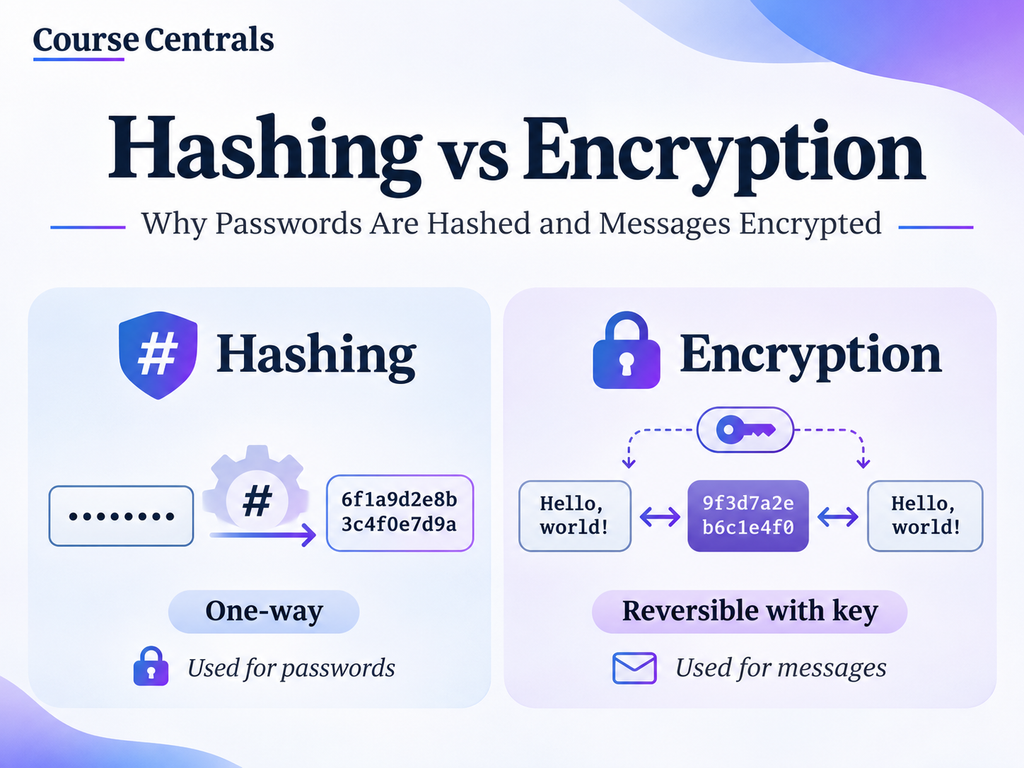
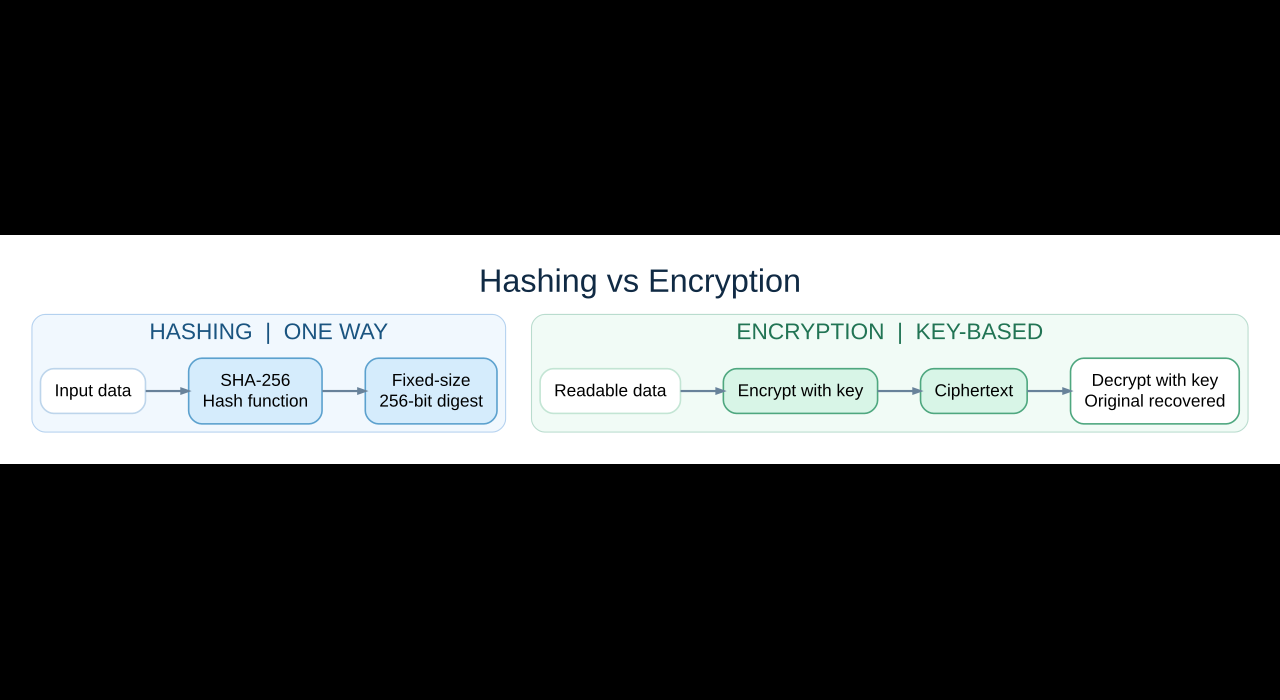
Hashing vs encryption: the differences at a glance
| Question | Hashing | Encryption |
|---|---|---|
| What is its main job? | Calculate a digest for integrity checks or verification | Protect confidentiality so authorized users can recover data |
| Can you reverse it? | Not by decrypting. Attackers may still guess low-entropy inputs such as passwords | Yes, with the correct decryption key and algorithm |
| Does it use a secret key? | Ordinary SHA-256: no. HMAC is a separate keyed construction | Yes. Symmetric encryption uses a shared secret; public-key systems use related keys |
| Typical output | A fixed-length digest for a selected algorithm, e.g. SHA-256 outputs 256 bits | Ciphertext whose size depends on the scheme and input |
| Examples | File checksums, password-verification schemes, components of digital signatures | Private messages, encrypted backups, sensitive database fields |
| Can it keep a message secret by itself? | No | Yes, when correctly implemented and keys remain protected |
A subtle but important point: a plain public hash is not proof of who created the file. If an attacker can change both a download and the checksum displayed beside it, the comparison tells you little. Use a checksum obtained from a trusted channel or a verified digital signature when authenticity matters. See the NIST definition of SHA-256.
1. How hashing works (with a real SHA-256 example)
A cryptographic hash function accepts data of many sizes and produces a digest with a fixed length for that algorithm. For example, SHA-256 produces 256 bits, often written as 64 hexadecimal characters. A tiny input change produces a different-looking digest, which makes hashes useful for detecting changes. Distinct inputs are not mathematically guaranteed unique hashes, but well-designed cryptographic functions make finding collisions computationally difficult.
| Text input | Actual SHA-256 output |
|---|---|
hello | 2cf24dba5fb0a30e26e83b2ac5b9e29e1b161e5c1fa7425e73043362938b9824 |
Hello | 185f8db32271fe25f561a6fc938b2e264306ec304eda518007d1764826381969 |
The only change is the capital H. The two 64-character SHA-256 values above were calculated from the exact UTF-8 inputs shown. You can reproduce them with the exercise below.
Try it yourself: a beginner SHA-256 lab
Time: about 5 minutes. What you need: Python 3, or a local Python environment. Use harmless sample text only: never paste your real passwords, credentials or sensitive files into online demonstration tools.
import hashlib

for message in ["hello", "Hello"]:
    digest = hashlib.sha256(message.encode("utf-8")).hexdigest()
    print(message, "->", digest)
    print("Hex characters:", len(digest))
Each printed digest should contain 64 hexadecimal characters. Change the capital letter, add a space or insert punctuation and run the code again. The output changes while the digest length stays fixed. This is a demonstration of SHA-256 for general hashing, not an example of secure password storage.
2. How encryption works (and why a key is necessary)
Encryption turns readable plaintext into ciphertext. An authorized recipient uses the proper decryption key to recover the original. Symmetric encryption uses a shared secret key. Asymmetric/public-key cryptography involves public and private keys; modern secure communications often use public-key techniques to establish keys and fast symmetric authenticated encryption for the actual message data.
For stored data, OWASP recommends well-established encryption and authenticated modes such as AES-GCM where appropriate. Authenticated encryption can provide confidentiality and tamper detection together. Merely scrambling text without trustworthy key management is not sufficient. Read OWASP’s cryptographic storage guidance.
Why not use Base64 instead of encryption?
Encoding is not encryption. Base64 changes how bytes are represented so systems can transmit or store them conveniently; anyone can decode it without a secret key. A Base64 string can look obscure, but it does not protect confidentiality. This misconception is especially common in beginner programming tutorials.
3. Why passwords are hashed but messages are encrypted
During login, a service generally needs to confirm that a newly entered password matches the user’s chosen password. It does not need to recover the original password. A secure service therefore stores a salted password hash produced by a purpose-built, deliberately expensive algorithm such as Argon2id. At sign-in it verifies the new input against that stored value.
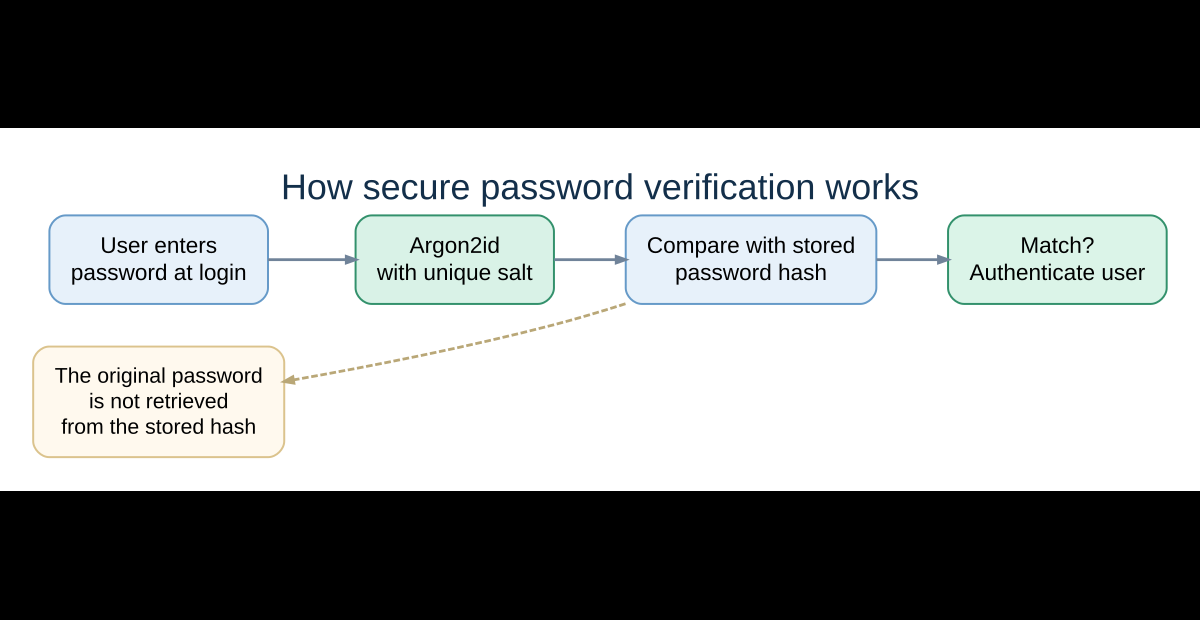
Critical distinction: do not store passwords by simply running hashlib.sha256(password) or by encrypting a password that your application could instead verify. SHA-256 is designed to be fast, which makes offline password guessing easier if a password database is stolen. OWASP recommends Argon2id for new systems (with scrypt, bcrypt or PBKDF2 depending on constraints and legacy requirements) and a unique salt per password. Official OWASP password storage guidance.
By contrast, recipients must be able to read a private message after it arrives. Encryption is appropriate because the original message has to be recovered. A password manager that must retrieve login credentials for its user has a different need than a login verifier and commonly relies on encryption and careful key management.
4. Which technique should you use? Six everyday scenarios
| Real-world question | Appropriate technique | Why and what to watch out for |
|---|---|---|
| Can the system verify a login password? | Argon2id-style password hashing | Use a unique salt, appropriate parameters and a reviewed library; ordinary SHA-256 is not enough. |
| Can a customer reopen a confidential PDF? | Authenticated encryption | The original document must be recoverable to an authorized user. |
| Did a downloaded installer change? | SHA-256 integrity check | Compare against a hash published through a trustworthy source; this alone does not prove who authored the file. |
| Can a recipient read a private message? | Encryption | The intended recipient must decrypt it; protect the keys and use an established protocol. |
| Can an API confirm a request has not been altered by outsiders? | Message authentication (for example HMAC) | A public plain hash cannot authenticate a message; a keyed MAC or signature supports authenticity. |
| Can binary data travel safely through a text-only channel? | Encoding such as Base64 | It helps transport bytes; it is not secrecy or encryption. |
5. Practical Python exercise: verify a downloaded file
Imagine that you download an installer from an official software publisher. That publisher also provides a SHA-256 checksum on a trusted page. You can calculate the digest of your local file and compare it. Use only files you own or trust; matching a digest is a consistency check, not malware scanning.
import hashlib
from pathlib import Path

file_path = Path("example-download.zip")  # Change to your file
expected_sha256 = "PASTE_OFFICIAL_SHA256_CHECKSUM_HERE"

sha256 = hashlib.sha256()
with file_path.open("rb") as f:
    for chunk in iter(lambda: f.read(1024 * 1024), b""):
        sha256.update(chunk)

actual_sha256 = sha256.hexdigest()
print("Calculated:", actual_sha256)

expected = expected_sha256.strip().lower()
if len(expected) == 64 and all(c in "0123456789abcdef" for c in expected):
    print("Matches official checksum:", actual_sha256 == expected)
else:
    print("Add the 64-character SHA-256 checksum from the official source.")
If a verified official checksum and your local digest do not match, do not assume the file is safe or identical. Re-check that you downloaded the intended version and investigate before using it. This example follows Python’s documented hashlib API.
6. Beginner mistakes to avoid
- “Hashes are unique IDs.” Collisions are possible in principle; strong algorithms make useful collision attacks very difficult.
- “Hashing is encryption that cannot be decrypted.” They are different operations with different goals and security properties.
- “SHA-256 is a safe password database format.” Use a dedicated salted password-hashing algorithm, not a fast general-purpose hash.
- “An unchanged SHA-256 proves a download is trustworthy.” Only if you obtained and trusted the expected digest; signatures add stronger provenance checks.
- “Base64 protects confidential data.” It is encoding, and no secret is needed to decode it.
- “AES or RSA by name guarantees security.” Secure configurations, authenticated modes, randomness, protocol design and key handling matter.
7. Quick decision checklist
Ask these in order: (1) Do I need to read the original data later? If yes, consider authenticated encryption. (2) Do I only need to check whether data changed? Use a cryptographic digest and obtain the expected value through a trusted channel. (3) Is this for user passwords? Use an adaptive password-hashing library with a unique salt. (4) Do I need proof of who sent or approved a message? Investigate a suitable MAC or digital signature. (5) Am I just representing bytes in another format? That is encoding, not encryption.
8. What to learn next
If you’re starting a cybersecurity career, the next useful step is to study authentication, cryptographic keys and secure communication, then practice with basic Python and Linux tools. Course Centrals’ Google Cybersecurity Professional Certificate guide explains a beginner-friendly structured route. For the coding skills used in the SHA-256 examples, see our free Python courses with certificate options and free programming courses hub. These are related learning pathways, not requirements for understanding the comparison.
Frequently asked questions
Can a password hash be decrypted?
No, hashing is not a reversible encryption process. However, a weak or commonly used password can sometimes be discovered by guessing candidates and comparing hashes, particularly if the system used an unsalted or fast password hash.
Is SHA-256 good for passwords?
Not on its own. SHA-256 is useful for general cryptographic digests and integrity checks, but is too fast for storing passwords securely. Use a dedicated password hashing algorithm such as Argon2id according to current OWASP recommendations.
Is AES a hashing algorithm?
No. AES is a symmetric encryption algorithm. SHA-256 is a cryptographic hash function. Different names are sometimes mentioned in the same security course because real systems combine several techniques.
What is the difference between hashing, encryption and encoding?
Hashing calculates a one-way digest, encryption protects readable data by transforming it into key-recoverable ciphertext, and encoding changes the representation of data without requiring a secret key.
Does hashing make a file secure?
A hash can help detect changes; it does not hide file content, prevent malware or authenticate a publisher by itself. For provenance, compare against a trusted checksum or verify a digital signature.
Official sources and verification
Last fact-checked: 11 November 2026. Core concepts were checked against the official references below. This is educational material, not a recommendation to build your own cryptographic algorithm or production authentication system.
- OWASP Password Storage Cheat Sheet (password hashing and salts)
- OWASP Cryptographic Storage Cheat Sheet (encryption modes and key management)
- NIST SHA-256 glossary (purpose of cryptographic digests)
- Python hashlib documentation (reproducible code examples)
- MDN digest() reference (browser-side SHA-256 capability)